Posts

MSSQL Join Statements
Image
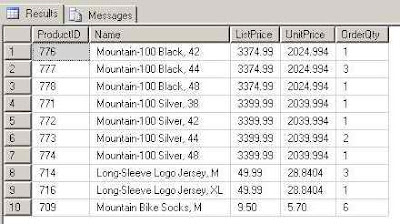
Join Statements in MS SQL Management Studio. There are several different Join types in here I will discuss them: Inner Join Statement Left Outer Join Statement Right Outer Join Statement Self Join Statement Joining tables is one of the most useful operations we have. Large data should be divided to several tables (see Normalization Rules) for maximum flexibility and minimum resources usage. Inner Join Statement: Inner Join is meant for combining rows between two tables, based on at least one column with the same data. Although columns with the same data are the most common way to use the Inner Join, there is also a possibility to conduct it with "greater then", "not equal" etc. Example:     SELECT TOP 10 P.ProductID,         P.Name,         P.ListPrice,         S.UnitPrice,         S. OrderQty     FROM Sales.SalesOrderDetail S  ...
Asp.Net Configuration - Open Broswer When Debug

Image
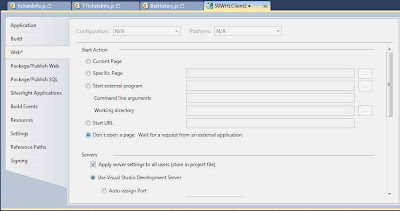
Configuring Asp.Net To Open New Browser Window When Start Debugging. Not too long ago I encountered a small problem that occurred to one of the developers in my team when he got a new computer. Previous to the new PC, whenever he clicked on "Start Debugging" (also known as F5) the solution compiled and opened a new browser window with the default page. After the new PC arrived the configurations in his Visual Studio 2010 were different. Meaning - Whenever he clicked F5, the project was compiling, but no browser windows appeared. With a short phone call I explained the steps he needs to do, but in order for it to be clear for all of us, I decided to upload it as a brief post. Right click on the project's name. Click on "Properties". A configuration manager window will open. Click on the third tab called "Web". On that tab you will have several sections, the first the is what we're interested in. on "Start Action" section (...

Configuration and Environment Variables - Visual Studio 2010

Image
How to create configuration or Environment variables in Visual Studio 2010. Environment variables are a great thing for when you publish your website to multiple places. It doesn't matter if you publish it to testing / staging / production environment or if you're publishing your site to several servers which require different methods to be called / different values assigned to parameters. Lets create a web application project (further explanations will be granted later) Open Visual Studio 2010 Create New Project -> ASP.NET Web Application As you can see, you automatically have two configuration options: Debug Release Right click on the project in the Solution Explorer . Click on Properties . Click on Build tab. Under that tab you have many configuration options (which will be discussed in another post). The field we're interested in is " Conditional compilation symbols ". While on Debug mode, we will write a variable name in t...

MSSQL Statements Syntax

Select Statement Update Statement Insert Statement Delete Statement Select Into Statement Many times I forget the exact syntax I should use whether I'm writing in MSSQL, My-SQL or Oracle.  This post is the first out of three posts designed to gather basic database statements and show a simple and clean example to them. Select Statement: Syntax 1:  SELECT column_1, column_3                      FROM Table Example: SELECT ID, Name                 FROM tbl_customers Syntax 2: SELECT * FROM Table (meaning - select all columns). Example: SELECT * FROM tbl_customers Update Statement: Syntax 1: UPDATE Table                     column_1 = 'value' Example: UPDATE tbl_customers         ...

How To Write Good Code - Diagram

Image
How To Write Good Code Funny Stuff... source . Hope you're having a good time, Elad Shalom, CTO at ITweetLive.com

IronRuby and Visual Studio 2010 - Integration

Image
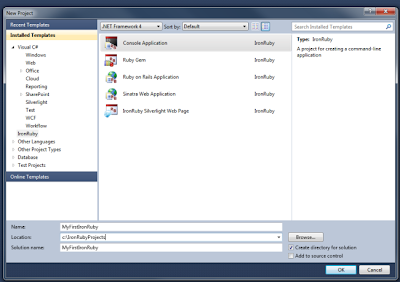
IronRuby and Visual Studio 2010. The IronRuby represents another one of Microsoft's attempts to have it all under one development environment. C / C++ VB.Net / C# / F# J# Their latest integration with jQuery IronPhyton And now - IronRuby. This addition is brand new and a very cool one.  The add-on for Visual Studio 2010 is exactly for those who like Ruby and wish it to be implemented in their .Net environment when needed. This IronRuby release (1.1.1) with Visual Studio 2010 integration includes: Ruby colorized and syntax checker. Interactive loop window. Directory based projects. Templates for common Ruby applications (including Ruby on Rails 3 , Sinatra , Gems and Silverlight based browser scripting app)    Source by Christopher Bennage. Thanks, Elad Shalom, CTO at ITweetLive.com

Multiple Solutions with the Same Structure - Visual Studio 2010 How To

Duplicating Solutions in Visual Studio 2010. As you probably know, I work in a company that provides sports betting solutions for many companies.  Each company has its own GUI and sometimes different flows inside the site. This is basically not hard to manage as long as you create a proper Skeleton Solution. A Skeleton Solution is a solution contains only the most relevant files and folders.  The same classes and JavaScript files that exist in every other solution. A Skeleton Solution will contain, in most of the times, several projects. I believe you've read my article about File Sharing in VS 2010 . This article is in some way an extension of the one I just mentioned. How to Create a Skeleton Solution from an Existing Solution: It's even easier then you think. Create a folder named: "Base Solution" or "Skeleton Solution". Copy the content of your existing solution's folder. Paste the content inside your Skeleton Solution's folder. ...